Gameplay Effects
Gameplay Effects (GEs) change attributes and gameplay tags on application, following a set of configurable rules. They are data-only, which means we don’t add logic to gameplay effects, we just set up the already existing properties.
5.1 Modifying Attributes (Attribute Modifiers)
One of the main purposes of Gameplay Effects is to modify the attributes of the Ability System Component that the effect is applied to. You can achieve this by defining Attribute Modifiers which can be either temporal (modifying the current value of the attribute), or permanent (modifying the base value of the attribute.)
Gameplay effects have a variety of configurable attribute modifiers that define specific operations that will be applied to the given attribute when the effect is applied. These operations (called Modifier Op) allow you to Add, Multiply, and Divide your attribute by a given value, or Override the attribute value completely. The value used for the operation is called a magnitude, and it can be calculated based on different magnitude calculation types.
5.1.1 Modifier Magnitude Calculation Types
The magnitude of an attribute modifier is defined by magnitude calculation type. These can be:
- Scalable Float: you can specify a hardcoded value, or provide a table.
- Attribute Based: the value is based on another attribute.
- Custom Calculation Class: you provide a class that performs a custom calculation.
- Set by Caller: the value is set dynamically by whoever is applying the GE.
5.1.1.1 Scalable Float
This is a pretty straightforward magnitude type. Whatever value you set is the value for your operation. For example, you could set the health to 30, or add 10 to mana, etc.
5.1.1.2 Attribute-Based Modifiers
RPGs and other types of games can have complicated relationships, where one attribute’s value is the result of sophisticated calculations based on other attribute. This can be achieved with attribute-based modifier magnitudes.
Attribute-based modifier magnitudes have a backing attribute to determine the magnitude value by performing a set of operations on it. For example, if I want my Max Mana to be exactly half of my Health, I’d need to use the following setup:
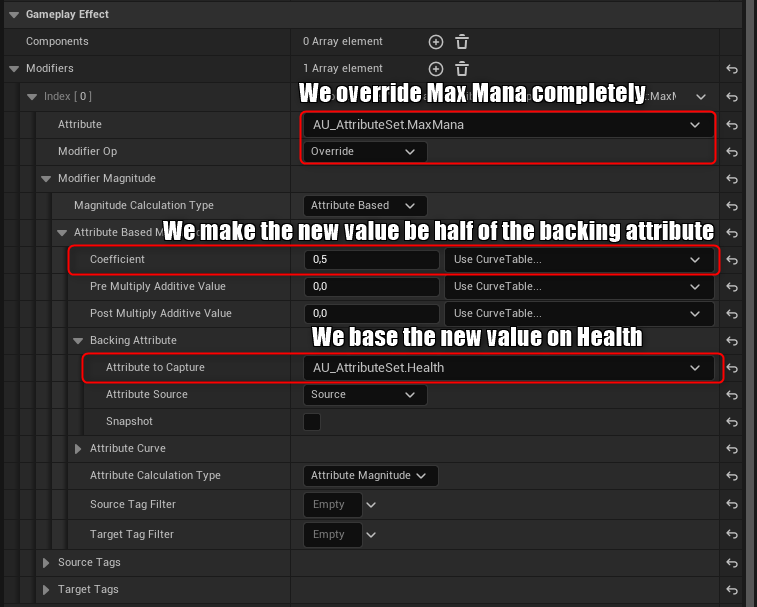
Note: if you use attribute-based modifiers inside an infinite gameplay effect, then the effect will automatically apply your modifiers when the capture attribute changes. This workflow is known as derived attributes.
As you can see from the screenshot above, there are a few different ways to modify the value of the captured attribute before setting it to our attribute. Here’s the gist of it:
- Pre Multiply Additive Value: adds this value to the attribute value before doing any other operation.
- Coefficient: multiplies the resulting value from the pre-multiply by this value.
- Post Multiply Additive Value: finally, adds this value to the result of the previous operations.
So basically, the formula for these values is:
(Coeff * (CapturedAttr + Pre)) + Post
5.1.1.3 Custom Calculation Class (MMC)
Sometimes we might want a more sophisticated calculation that does not just rely on captured attributes, but other external values as well (such as member variables from the ASC owner). In those cases, we might opt to use Custom Calculation Classes.
This is a custom class that we create to define the calculation that should be used for the modifier magnitude. In the course, for example, we use MMCs to make calculations that include the player’s level, since we decided not to make the Level an attribute itself.
MMCs allow you to override the void CalculateBaseMagnitude(const FGameplayEffectSpec& Spec) Blueprint Native Event to return the magnitude of the attribute modifier it is associated with. You can capture specific attributes to get their value at the time of calculation, and you can get a bunch of data from the gameplay effect spec. Here’s an example of an MMC:
UCLASS()
class AURA_API UAU_MMC_MaxHealth : public UGameplayModMagnitudeCalculation
{
    GENERATED_BODY()
    public:
    UAU_MMC_MaxHealth();
    private:
    FGameplayEffectAttributeCaptureDefinition VigorCaptureDefinition;
    virtual float CalculateBaseMagnitude_Implementation(const FGameplayEffectSpec& Spec) const override;
};
UAU_MMC_MaxHealth::UAU_MMC_MaxHealth()
{
    VigorCaptureDefinition = { UAU_AttributeSet::GetVigorAttribute(), EGameplayEffectAttributeCaptureSource::Target, false };
    RelevantAttributesToCapture.Add(VigorCaptureDefinition);
}

float UAU_MMC_MaxHealth::CalculateBaseMagnitude_Implementation(const FGameplayEffectSpec& Spec) const
{
	// Get the source and targets tags
	const FGameplayTagContainer* SourceTags = Spec.CapturedSourceTags.GetAggregatedTags();
	const FGameplayTagContainer* TargetTags = Spec.CapturedTargetTags.GetAggregatedTags();

	// Create Evaluation Parameters (we need to add the source and target tags for tag-related conditions to work)
	FAggregatorEvaluateParameters EvaluationParameters;
	EvaluationParameters.SourceTags = SourceTags;
	EvaluationParameters.TargetTags = TargetTags;

	// Determine the vigor magnitude from the captured attribute
	float VigorMagnitude;
	GetCapturedAttributeMagnitude(VigorCaptureDefinition, Spec, EvaluationParameters, VigorMagnitude);
	VigorMagnitude = FMath::Max(VigorMagnitude, 0.f);

	// Perform our calculation, which uses the Level value, which is not available for simple Attribute-based magnitudes
	const IAU_CombatInterface* CombatInterface = Cast<IAU_CombatInterface>(Spec.GetContext().GetSourceObject());
	const int32 Level = CombatInterface ? CombatInterface->GetCombatLevel() : 1;

    // The final value will be a base value of 80 + vigor multiplier + level multiplier
	return 80.f + 2.5 * VigorMagnitude + Level * 10.f;
}
In the example above, we let the MMC know that we want to capture the Vigor attribute from the target at the time of execution, and then during execution we use that vigor value to calculate our max health value. The source and target tags are just boilerplate for tag-related functionality.
5.1.1.4 Set By Caller
(Pending) Not there in the course yet
5.1.2 Modifier Order of Operations
It’s important to note that attribute modifier operations are applied sequentially, regardless of operation type. Operations won’t follow PEMDAS or any other rule when applying multiple modifications in a single Gameplay Effect. Each operation will use the result of the previous operation.
5.1.3 Custom Executions
(Pending) We haven’t gotten there in the course yet.
5.2 Gameplay Effects and Gameplay Tags
Gameplay tags are a very powerful system which allows tagging and querying state. Gameplay Effects make extensive use of this system in the following ways.
5.2.1 Granted Tags
Gameplay Effects can apply tags to the target actor of the effect. This is very useful because we can then have a clear way to query which effects are active for an actor at any given time.
Granted tags are stackable, but they are only assigned once if multiple effects of the same stackable type are applied (see section 5.3.3). If the effect is not stackable, then each GE application will also apply an instance of the tag, increasing the tag count.
Note: granted tags are meant to communicate state while a gameplay effect is active. For that reason, configuring an instant gameplay effect to grant a tag will not work. Tags are only applied when the effect has duration (or is infinite).
5.2.2 Owned Tags
Apart from granting tags to their target, gameplay effects can also own tags. This can be useful because we won’t always want to mark a target with a certain tag, but rather we want to react to a gameplay effect being applied and query information from the application itself.
Tags can’t be granted to an actor by an instant GE, but an instant GE can own tags, and so you can listen for GEs being applied in an Ability System Component, and check for specific tags to react to a particular effect.
See section 5.5 for more information about listening for GEs.
Note: Owned tags are referred in code as Asset Tags. For example, you can call GetAllAssetTags() on an FGameplayEffectSpec to access these owned tags.
5.3 Gameplay Effect Application Rules
Gameplay effects are very flexible in the way the are applied. There are many properties in GEs that affect application policies, and each property changes significantly the behavior and the capabilities of the GE.
5.3.1 Duration Policy
The duration policy describes how long a gameplay effect remains active, and also affects whether the effect is temporary or permanent. There are three different duration policies.
5.3.1.1 Instant
These are one-off effects, where the modifier is applied instantly. The change in this effect is permanent, meaning that any attribute change triggered by this effect is done to the Base Value of the attribute.
5.3.1.2 Has Duration
These are effects that make a temporary change for a given period of time, after which the modification is reverted. Any change is temporal, meaning that any attribute change triggered by this effect is done to the Current Value of the attribute (unless they are configured as periodic (5.3.2)).
5.3.1.3 Infinite
These are effects that are applied indefinitely. These are also temporal effects, but they remain applied until we manually remove them (unless they are configured as periodic (5.3.2)).
5.3.2 Periodic Effects
Both Has Duration and Infinite effects can be configured to be periodic, which means that changes to attributes are applied periodically (on set intervals of time) while the effect remains active.
Periodic effects have a crucial difference compared to normal duration and infinite effects - they apply permanent changes! Periodic changes are NOT undone once the effect is removed.
Duration and Infinite effects can be turned into Periodic effects simply by changing the Period property to a non-zero value.
5.3.3 Stacking
Stacking allows us to configure what happens when an effect is applied at an instant where an effect of the same type is already active on the target.
5.3.3.1 Stack Types
Stack Type: None With no stacking, the effect is applied independently as many times as it’s added. If I take three health potions in a row, all three will be active at the same time, all healing me according to their own configurations.
Stack Type: Aggregate by Source Stacks are tracked per source. Each source will have its own dedicated stack, with its own dedicated rules. For example, if I take 2 heal potions and one heal crystal, and both apply the same effect, then I’ll have a stack with 2 counts of healing effects from the potions, and one count of the healing effect from the crystal.
Stack Type: Aggregate by Target A single stack lives on the target, regardless of how many sources have applied the effect.
5.3.3.2 Stacking Policies
PENDING
5.3.3.3 Overflow Settings
PENDING
5.3.3.4 Factor In Stack Count
PENDING
5.4 Applying Gameplay Effects
Applying a gameplay effect involves three distinct pieces, each with a clear responsibility. At first it might seem overcomplicated, but understanding each piece makes the workflow much less cryptic.
5.4.1 Gameplay Effect Class
The actual class of the GE defines what effects should do. I.e., what attribute should change, what gameplay tag should be added, etc.
It’s read-only data that defines what a gameplay effect spec should do with the additional data that is provided. That’s it. A GE is just plain data.
A GE class is never actually instantiated. Everything that need to be read from a GE is taken from the CDO.
5.4.2 Gameplay Effect Spec
Short for Gameplay Effect Specification. Rather than instantiating a full UObject for each application, GAS uses this lightweight struct to represent a specific application of a gameplay effect.
It holds all per-application data: GE level, captured attribute magnitudes, granted tags, a context instance, etc. For example, for a GE that applies damage from a Curve Table, the Spec resolves the magnitude at the given level and stores it ready for application.
5.4.3 Gameplay Effect Context
This struct contains specific information about the context of the GE application, rather than information about the effect itself. For example, it stores who triggered the effect, from which location, with what hit result (if any), etc.a
This is a separate struct because multiple GE Specs can share the same context, and the context struct is meant to be inherited and extended, while GE Specs are not.
5.4.4 Gameplay Effect Handles
When referencing GE Specs and GE Contexts, we don’t use direct references to the structs themselves. We use handles.
Both FGameplayEffectSpec and FGameplayEffectContext are stored as TSharedPtrs internally, and their respective handles (FGameplayEffectSpecHandle and FGameplayEffectContextHandle) wrap those pointers to enforce clear ownership semantics. Handles are also compatible with blueprints, unlike raw TSharedPtrs.
5.5 Reacting to Gameplay Effects / Attribute Changes
During the process of applying or removing gameplay effects, there are many places to react to different events. This is useful to validate prerequisites, enforce max values, or simply listen to changes in general.
5.5.1 PreAttributeChange (AS)
PreAttributeChange is a virtual function in the Attribute Set that will be called right before a value change happens in an attribute (either caused by a gameplay effect, or a direct modification). This gives us a chance to inspect the value and modify it as we see fit. This is only called for changes to the Current Value.
Here is an example of clamping the health value to the max health value:
void UAU_AttributeSet::PreAttributeChange(const FGameplayAttribute& Attribute, float& NewValue)
{
	if (Attribute == GetHealthAttribute())
	{
		NewValue = FMath::Clamp(NewValue, 0.f, GetMaxHealth());
	}
}
This is not a safe guarantee that values will always be what you expect after changing them, however! You are not protecting the actual changes to the Base Value — you are only making sure that any Current Value query result is clamped.
For example, imagine that our game has a potion that increases your health by 50, and your max health is 100. Imagine you are currently at max health and take 4 potions, what happens?
- Base Value will be modified internally without any guards. Your actual base health will be 200!
- However, any time the Current Value is updated to reflect the Base Value, it is first clamped to 100, so the resulting current value will be 100.
- Everything will seem like it’s correct until you take a 50-point damage hit. Base Value will be reduced from 200 to 150, and CurrentValue will be clamped to 100 again. It will seem like you didn’t take damage at all!
That’s the risk of PreAttributeChange… it’s not necessarily showing the whole truth, as it doesn’t guard the base value. It’s still useful, but should probably be used in combinations with other methods.
5.5.2 PostGameplayEffectExecute (AS)
PostGameplayEffectExecute is another virtual function in the Attribute Set, where you can react to a gameplay effect after it has applied a permanent modification to the base value of an attribute.
This will NOT be called for duration-based gameplay effects that only modify the Current Value. It is only ever called for Base Value modifications. Thus, it makes this a useful companion to PreAttributeChange as it does guard the Base Value.
void UAU_AttributeSet::PostGameplayEffectExecute(const struct FGameplayEffectModCallbackData& Data)
{
	if (Data.EvaluatedData.Attribute == GetHealthAttribute())
	{
		SetHealth(FMath::Clamp(GetHealth(), 0.f, GetMaxHealth()));
	}
}
5.5.3 GetGameplayAttributeValueChangedDelegate (ASC)
The ASC has a very useful function to bind to a delegate that gets broadcasted when the passed-in attribute changes.
This is called both in server and client, but ONLY when the cause for a change is a gameplay effect.
Here’s an example of gameplay code that listens to a change in the health attribute to broadcast a custom delegate:
const FGameplayAttribute HealthAttribute = AttributeSet->GetHealthAttribute();
AbilitySystemComponent->GetGameplayAttributeValueChangedDelegate(HealthAttribute).AddWeakLambda(this, [this](const FOnAttributeChangeData& AttributeData)
{
	OnHealthChangedDelegate.Broadcast(AttributeData.NewValue);
})
5.5.4 Gameplay Effect Delegates (ASC)
There are many delegates that get broadcasted by an ASC when effects are applied, removed, or modified. Here is a list of the most relevant delegate I’ve used.
5.5.4.1 OnGameplayEffectAppliedDelegateToSelf
This delegate gets broadcasted any time a GE is applied to the owning ASC. It is called once per application, so stacking GEs will call this delegate every time a new stack of the GE is applied.
This is only called in server!